Survival Log Loot Spotter
See the missing rows before the outbreak clock calls your bluff.
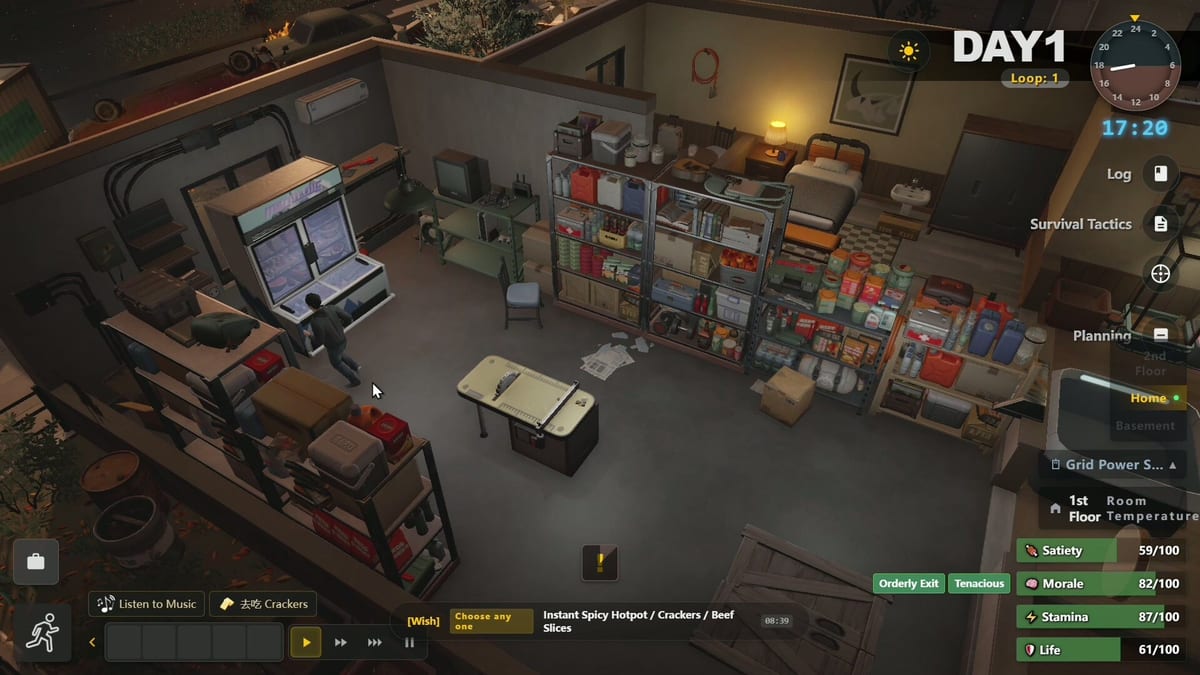
Loot Spotter is the pre-disaster live inventory gap tool described in Survival Log Dev Logs: a way to see what your stockpile is missing before the outbreak clock expires. Think of it as a ruthless mirror for hoarding. Midnight Workshop and Lilith Games built the fantasy around checklist depth — seven major categories and eighteen dimensions — so players stop buying random comfort items while Tier 0 survival rows stay empty. This page explains how to use that gap lens with wiki tools before the August 12, 2026 release, including the live Steam demo (app 4164790).
What Loot Spotter solves
Without a gap tool, players remember the last aisle they walked and forget the basement fuel can. Loot Spotter language pushes you to close dimensions, not vibes. Pair it with the interactive Stockpile Planner and the ordered Priority Checklist. For a prose deep dive into the seven-by-eighteen framing, open Checklist Dimensions.
Planning Points (alias Conviction Points in one log; we prefer Planning Points) still limit how many gaps you can close per day. Spotter does not print free time. It prints truth.
Seven categories, eighteen dimensions
Treat the seven major categories as warehouse zones and the eighteen dimensions as measurable rows inside those zones. Exact UI labels can shift across demo patches — re-verify after notes in Demo Update — but your notebook should always answer: water days, calorie days, boarding capacity, fuel hours, medical minimums, light/heat comfort, and tool redundancy. Food detail lives in Food and Water. Power consumables live in Fuel and Power Gear. Furniture that is not a survival appliance waits behind Furniture and Appliances.
Pre-disaster workflow
- Open Spotter / checklist view and mark real ownership, not intended purchases.
- Pick the single worst Tier 0 gap.
- Build a city thesis with How to Stockpile and City Locations.
- Return before risk spikes per Exploration Risk.
- Rescan gaps; only then consider a second category.
Warehouse Clerk minds will feel at home — see Warehouse Clerk. Student and Worker roles still need the same honesty; role fantasy does not fill a water row.
After disaster, the tool changes job
Post-outbreak, gap thinking remains, but Smart Action Suggestions may drive chores that compete with scavenging. Read Smart Actions. Weather can invalidate farming assumptions overnight — Weather and Cold — so Spotter-style reviews should include heat and crop risk, not only cans.
Drone trades should close Spotter gaps, not create new ones. See How to Drone Trade.
Common misreads
- Treating a full visual shelf as a green category.
- Ignoring fridge power when counting perishable calories (Power Grid).
- Buying duplicate tools while boards are missing for Fortify Doors and Windows.
- Skipping medicine because the demo week felt healthy.
Demo habit
Each demo morning, write the top three red dimensions before unpause. Use Day Planner. If a patch renames checklist rows, update your notes from Dev Log Systems. Loot Spotter is only as strong as your willingness to shop the boring aisle first.
Frequently Asked Questions
Quick answers to the most common survivor questions.
Is Loot Spotter only a pre-disaster tool?
Dev Log framing centers pre-disaster gap spotting. After outbreak, keep gap thinking but expect Smart Actions to compete for your chore time.
What do seven categories and eighteen dimensions mean?
Seven broad stockpile zones and eighteen measurable rows inside them. See Checklist Dimensions for the deep dive and Priority Checklist for order.
Does Spotter replace the Stockpile Planner on this wiki?
No. Use both: Spotter/checklist truth in-game, Stockpile Planner as a wiki-side gap board you can mark quickly.
What is a common false green reading?
Shelves that look full while water days or fuel hours are still red. Visual bulk is not a dimension score.
How often should I rescan gaps in the demo?
At least every morning before spending Planning Points, and again after any large shopping or drone trade.